
Digital fitness workflows: AI automation saves 10+ hours
TL;DR:
- Digital fitness workflows combine AI, automation, and trainer expertise to scale personalized client management.
- Safety and personalization require human review, customization for edge cases, and careful data privacy handling.
- Trainers should view AI as an augmentative tool that enhances their judgment rather than replacing their critical role.
Automation is changing how trainers work, and the fear that it will replace coaches is one of the most persistent misconceptions in the industry. The reality is different. When you build a digital fitness workflow, you combine AI-driven automation, smart scheduling, and your own coaching expertise into a system that handles the repetitive work so you can focus on what clients actually pay for: results, accountability, and genuine connection. This article breaks down what digital fitness workflows are, how to keep them safe and personalized, how platforms compare, and exactly how you can start building yours today.
Table of Contents
- Understanding digital fitness workflow
- Safety, personalization, and edge cases in AI fitness workflows
- Comparing digital platforms: Custom software vs. generic solutions
- Putting digital fitness workflow into practice: Strategies for trainers
- A fresh perspective: The real role of trainers in the AI era
- Supercharge your workflow with TrainingPro's AI tools
- Frequently asked questions
Key Takeaways
Understanding digital fitness workflow
A digital fitness workflow is the organized sequence of steps you use to manage clients, automate routine processes, and deliver personalized programs using AI and digital tools. Think of it as your business operating system. Instead of manually sending check-in messages, updating spreadsheets, or drafting every program from scratch, you set up triggers and rules that do the heavy lifting for you.
The core elements of a digital fitness workflow include:
- Client intake: Automated onboarding forms, health history collection, and goal-setting questionnaires
- Engagement triggers: Scheduled check-ins, progress prompts, and milestone notifications
- Program updates: AI-generated draft plans reviewed and approved by you before delivery
- Feedback loops: Client ratings, session notes, and wearable data feeding back into the system
The difference from manual processes is significant. Getting 10x results from AI as a fitness professional starts with understanding that automation handles volume while you handle nuance. A trainer managing 20 clients manually spends hours on admin. A trainer using a digital workflow can scale to 50 or more clients without sacrificing quality.
Building the workflow follows a clear sequence. You start by mapping your client journey from first contact to long-term retention. Then you define triggers, such as a new intake form submission kicking off an automated welcome sequence. Next, you set AI rules for program generation, specifying parameters like training frequency, equipment, and injury flags. Finally, you build in a human review step before anything goes to the client.
This last step is what experts call the “human-in-the-loop” approach. As research confirms, digital fitness workflows involve mapping client journeys, triggers, AI agent rules, and iterative refinement. Without that human review layer, you risk sending out plans that are technically correct but contextually wrong for a specific client.
Critical Rule
Human-in-the-loop is not optional. It is the safety net that keeps your professional reputation intact and your clients progressing safely.
When you approach optimizing operations with AI tools this way, you get a workflow that scales without losing the personal touch that defines great coaching. The goal is not to automate everything. It is to automate the right things.
Safety, personalization, and edge cases in AI fitness workflows
With the core workflow outlined, safety and personalization are crucial for effective client management. AI can draft a solid program for a healthy 30-year-old with standard goals. But what about a 55-year-old with a recent rotator cuff repair, or a teenager with a metabolic condition? These are edge cases, and they are where digital workflows can break down if you have not built in the right guardrails.
Edge cases require custom rules for injuries, privacy, and clinician review. Here is a practical numbered process for vetting AI-generated plans:
- Flag high-risk profiles during intake using specific health history fields
- Apply custom AI rules that restrict certain exercise categories for flagged clients
- Route flagged plans to a mandatory human review queue before delivery
- Consult a clinician or specialist for clients with complex medical histories
- Document every override so you have a clear record of your professional judgment
Pro Tip
Never send an AI-generated plan directly to a client with a reported injury or chronic condition. Always review it yourself first, and when in doubt, loop in a relevant healthcare professional.
Personalization goes beyond injury management. Personalized fitness plans via AI require careful data privacy and tailored rules to work effectively. This means your AI system needs more than just age and goal data. It needs training history, lifestyle factors, sleep quality, and stress levels. Integrating wearable real-time data into your workflow lets the AI adapt recommendations dynamically, not just at the point of program creation.
Privacy is a real concern here. Client health data is sensitive, and you are responsible for how it is stored and used. Choose platforms that are transparent about data handling, use encrypted storage, and give clients control over their information.
For clients recovering from injury, AI-powered program modification after injury can suggest regression options and alternative movements, but your judgment on load, timing, and psychological readiness is irreplaceable. Similarly, using AI-powered exercise library ideas helps you build variety into programs without hours of manual research, as long as you apply your expertise to the final selection.

The bottom line: AI handles breadth, you handle depth. That combination is what makes digital fitness workflows genuinely powerful for client outcomes.
Comparing digital platforms: Custom software vs. generic solutions
Choosing the right digital platform impacts workflow quality and client outcomes. Here is how the main options compare.
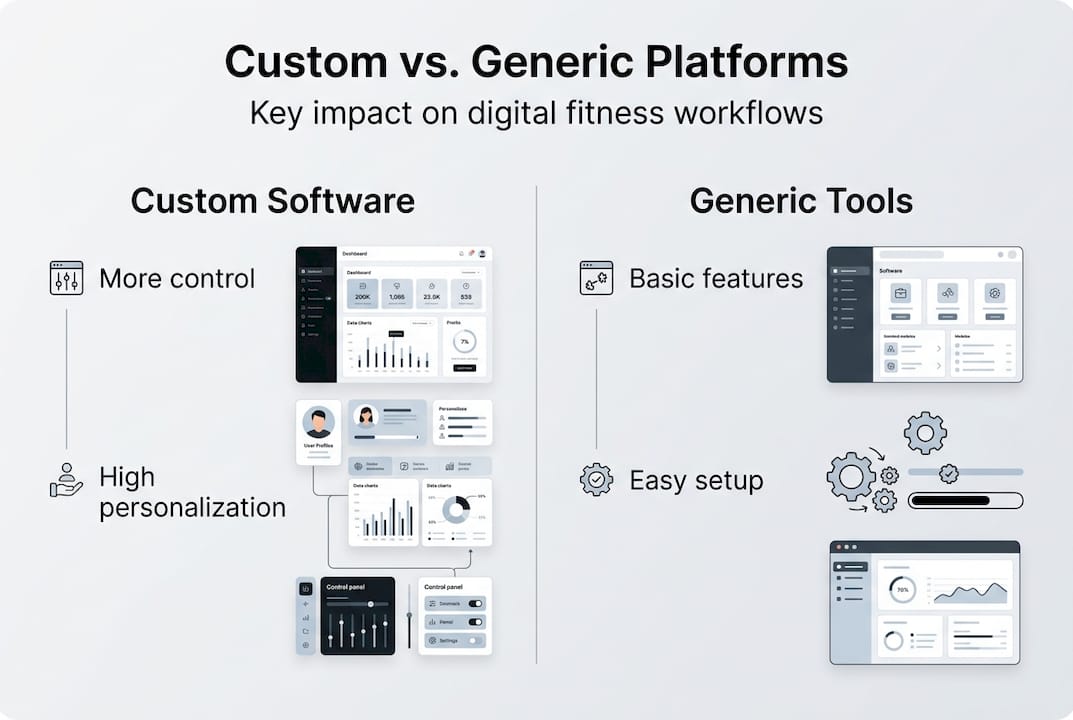
Generic software limits innovation, while custom platforms allow trainers to scale operations and maintain personalization. This is a critical distinction. A generic CRM or project management tool can technically manage client records, but it was not designed for program delivery, progress tracking, or exercise library management.
Advantages of purpose-built fitness platforms include:
- Workflow flexibility: Adapt processes to your specific training style and client base
- Personalization at scale: Deliver individualized programs without manual rebuilding each time
- Wearable and app integration: Pull real data into client records automatically
- Fitness-specific reporting: Track metrics that actually matter for client progress
For a solo trainer or small studio just starting out, a generic tool might seem like a cost-effective entry point. But as your client base grows, the limitations become friction. You end up spending time working around the software rather than with it. Investing in a platform built for fitness professionals pays off faster than most trainers expect.
For larger operations, the case is even clearer. Scaling a fitness business with automation requires infrastructure that grows with you, not against you. Reviewing an AI coaching toolkit purpose-built for trainers gives you a benchmark for what modern platforms should offer.
Exploring business growth strategies for trainers consistently points to platform choice as one of the highest-leverage decisions a fitness professional makes.
Putting digital fitness workflow into practice: Strategies for trainers
Knowing the options, trainers can now make digital workflows work for their businesses. Here is how to get started and keep momentum.
Key strategies to implement:
- Segment your clients by goal type, training level, and risk profile so automation applies the right rules to each group
- Automate check-ins with scheduled messages that prompt clients to log progress or flag issues
- Use AI for program drafts and spend your time reviewing and refining rather than building from scratch
- Integrate wearables so real-time data informs program adjustments without manual data entry
- Set up feedback loops that capture client responses and feed them back into your AI rules
Here is a practical look at how specific tools and tasks connect:
Pro Tip
Start with one workflow area, such as automated check-ins, run it for 30 days, measure engagement rates, then expand. Trying to automate everything at once leads to errors and overwhelm.
Automation scales fitness business operations while human guidance maintains personalization and safety. The trainers who get the best results from digital workflows are not the ones who automate the most. They are the ones who automate smartly and stay closely involved in client outcomes.
For fast, practical implementation, the guide on creating workout programs fast using AI walks you through the exact steps. And if you want to maximize your daily output, the productivity hacks for automation resource covers the highest-impact moves for busy trainers.
A fresh perspective: The real role of trainers in the AI era
Having covered the practical side, it is worth rethinking what trainers are actually for in a world of digital fitness.
Here is the contrarian truth: as AI and automation become more capable, your human judgment becomes more valuable, not less. When every trainer has access to the same AI tools, the differentiator is not the technology. It is the coach behind it.
"If you rely on technology alone, you lose client trust. Automation gives you time back so you can invest it in deeper coaching, not less coaching."
AI augments, not replaces, coaches. Automation enables scalability, but trainers add the safety, empathy, and personalization that no algorithm can replicate. The trainers who thrive in this environment are the ones who use AI to handle volume and redirect their energy toward the moments that matter: the hard conversation about a client's plateau, the motivation boost before a tough session, the nuanced program adjustment that no intake form could predict.
The path to 10x results and coaching expertise is not about replacing your instincts with data. It is about letting data free up your instincts for the work only you can do.
Supercharge your workflow with TrainingPro's AI tools
You now have a clear picture of what digital fitness workflows look like and how to build one that is safe, scalable, and genuinely effective for your clients. The next step is putting the right tools in place.
TrainingPro is built specifically for fitness professionals who want to move faster without sacrificing quality. From the AI workout builder that drafts personalized programs in minutes, to the full suite of client management and marketing tools available through TrainingPro fitness business software, everything is designed to fit your workflow. Download the free AI-powered workout builder guide to see exactly how trainers are saving 10 or more hours every week with AI-driven automation.
Frequently asked questions
A digital fitness workflow is the organized sequence of steps trainers use to manage clients, automate processes, and personalize programs using AI and digital tools. As research outlines, effective workflows combine mapping, automation, and human-in-the-loop review to keep quality high at scale.
AI automates routine tasks like check-ins and program drafts, then surfaces data-driven insights so you can focus on safety, motivation, and custom coaching. Automation scales operations while human oversight keeps personalization and safety intact.
Yes, provided you use custom rules, review every AI-generated program, and bring in clinician oversight for high-risk or special populations. Edge cases need custom rules and careful review before any plan reaches the client.
No. AI and automation handle repetitive tasks efficiently, but trainers are essential for safety, empathy, and the kind of deep personalization that builds long-term client trust. As the evidence shows, AI augments coaches rather than replacing them.
Begin by mapping your current client journey, identifying one area to automate first (check-ins are a great starting point), and integrating an AI tool with a built-in human review step. Workflow implementation follows client journey mapping and trigger definition before you scale further.
Recommended
- AI-Powered Workout Builder Guide | Transform Your Fitness Business | TrainingPro
- 10 productivity hacks for personal trainers: automate & engage | TrainingPro
- How to Get 10x Results from AI as a Fitness Professional | TrainingPro
- How to create workout programs fast using AI in 2026 | TrainingPro
- Website automations for small business: streamline and grow
Ready to Transform Your Fitness Business?
Join thousands of trainers using TrainingPro to automate admin, grow their client base, and focus on what they love—coaching.
Start your 14-day free trial • Cancel anytime


