
Stop Guessing: Introducing Custom Client Check-Ins
If you're still asking every client for the same three metrics—weight, sleep, and stress—you're not collecting data. You're running a script. Your clients are unique, their goals are specific, and your check-in process should reflect that. Generic check-ins give you generic data, leading to generic coaching.
It’s time to stop guessing and start measuring what truly matters.
The Problem with One-Size-Fits-All Check-Ins
Most coaching platforms offer a rigid check-in system. You get a handful of predefined fields, and that's it. This forces you into a box:
- Fat loss client? You track weight. But what about body measurements, progress photos, or hunger levels?
- Strength athlete? You might want to track their recovery, daily nutrition, or even their mindset heading into a heavy session.
- Lifestyle client? Maybe you need to monitor their daily step count, water intake, or adherence to a new habit.
When your tools are generic, your coaching becomes generic. You can't connect the dots between their actions and their results with any real precision. It all becomes guesswork.
The Solution: Build Check-Ins That Match Your Coaching Style
We're excited to introduce Custom Client Check-Ins in TrainingPro. You can now build your own check-in templates from the ground up, using any combination of fields you need.
This means you can create specific templates for:
- Different client goals: Fat loss, muscle gain, performance, wellness.
- Different phases of training: A/B testing a new nutrition protocol, a deload week, or a competition prep.
- Your unique coaching philosophy: Track the metrics you know lead to results.
Your Data, Your Way
Stop letting your software dictate your coaching process. With Custom Check-Ins, you're in control. Track what matters, ignore what doesn't, and get the precise data you need to make better coaching decisions.
How It Works: A Step-by-Step Guide
Let's walk through a real-world example. We'll create a new check-in template to track a client's weight and bicep circumference, assign it, and see how the data visualizes over time.
1. Create a New Check-In Template
First, head to the Check-In Templates section in your dashboard and click Create Template.
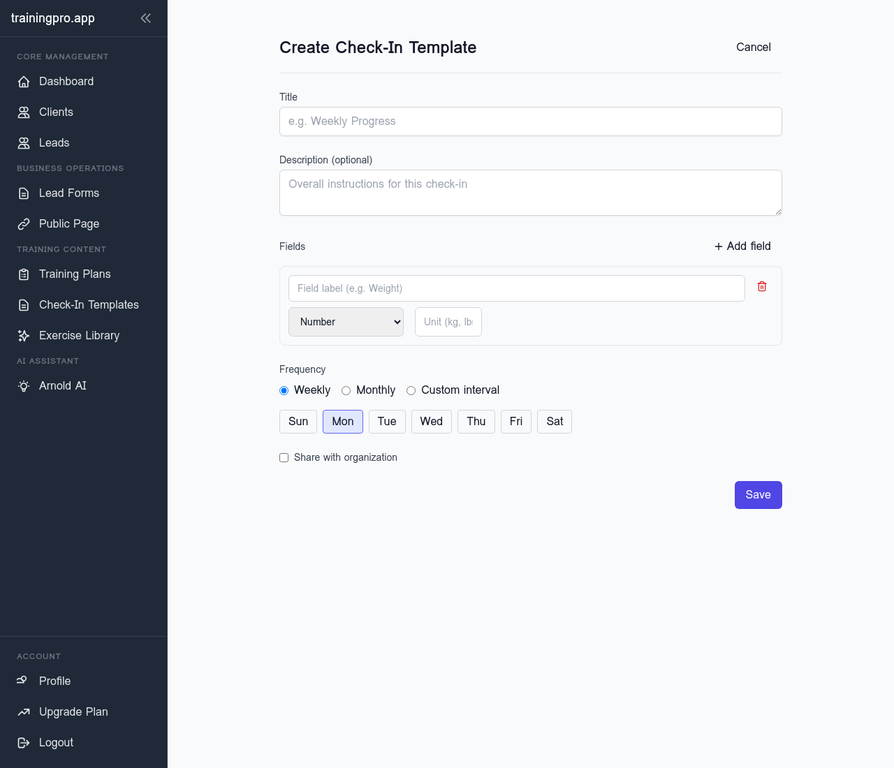
Give your template a clear name, like "Weekly Progress Check-In".
2. Add Your Custom Fields
This is where the magic happens. Click Add field to start building your template. We'll add two numeric fields:
- Weight (Unit: kg)
- Bicep Circumference (Unit: cm)
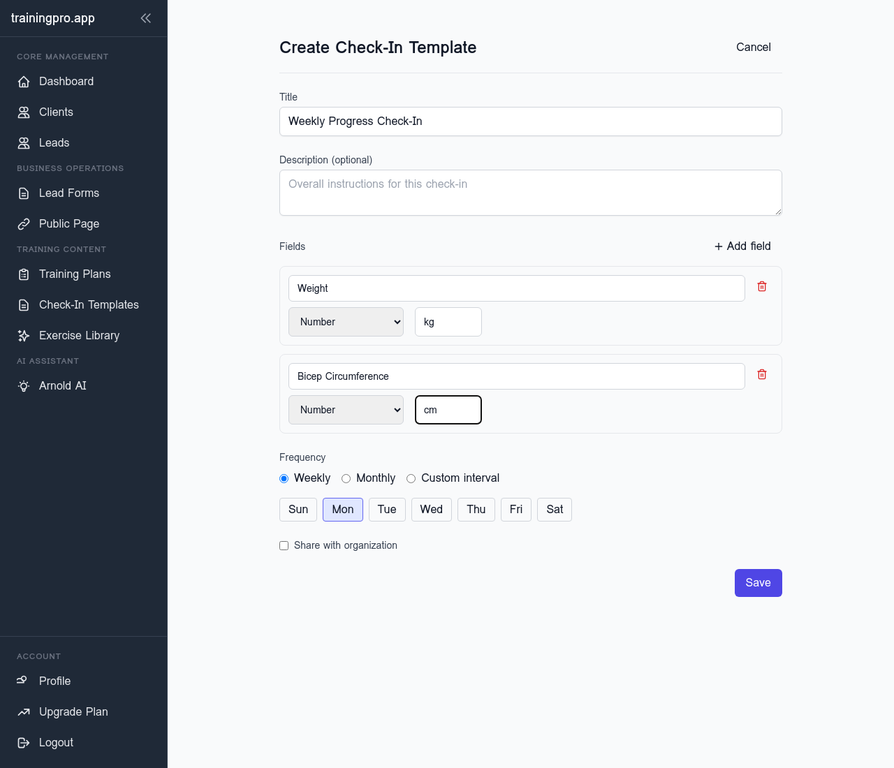
You can add as many fields as you need, choosing from number, text, or file upload types. Once you're done, hit Save.
3. Assign the Template to a Client
With your template created, you can now assign it to one or more clients. Open the template, click Assign to client, and select the client from the dropdown.
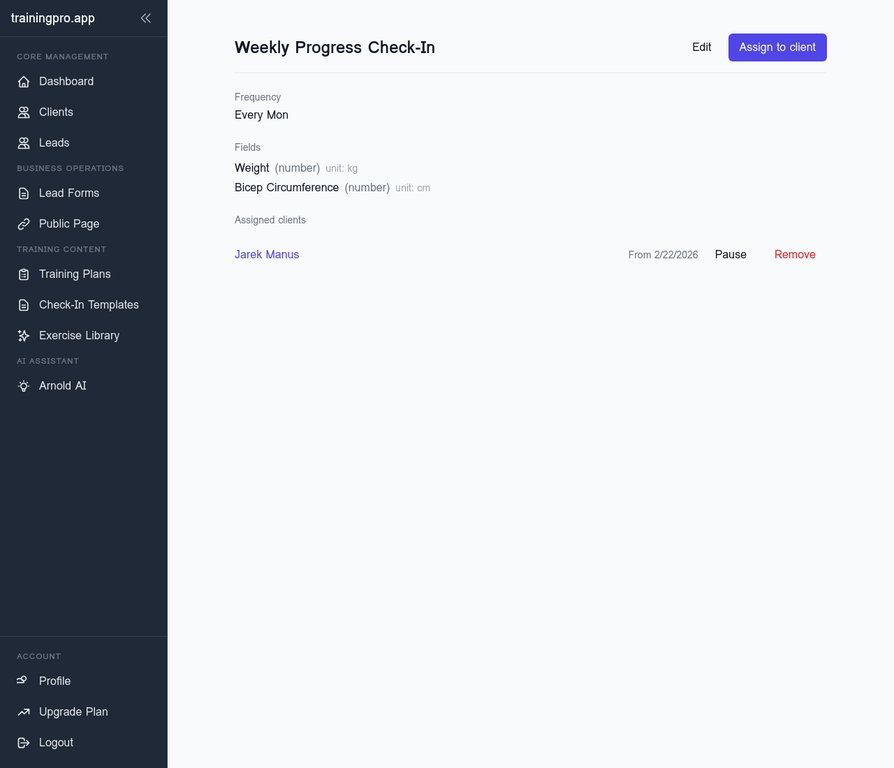
4. Submit Check-Ins and Track Progress
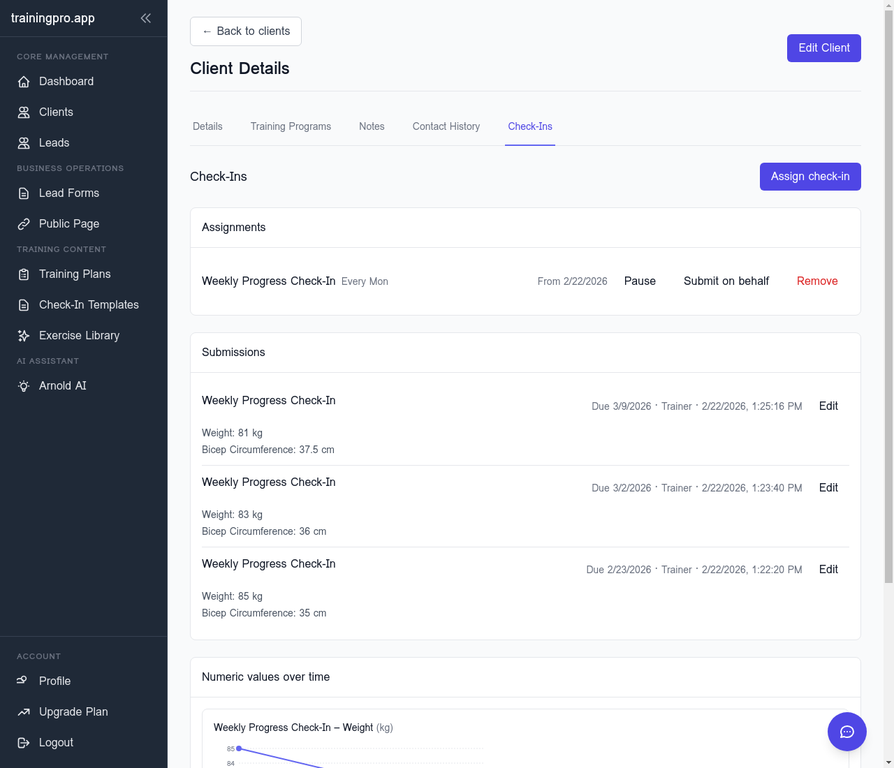
Your client will now be prompted to fill out this check-in based on the schedule you set. You can also submit check-ins on their behalf—perfect for in-person sessions.
Let's add three check-ins to see how the data populates:
- Week 1: Weight: 85kg, Bicep: 35cm
- Week 2: Weight: 83kg, Bicep: 36cm
- Week 3: Weight: 81kg, Bicep: 37.5cm
As you submit the data, the charts update in real-time.
5. Visualize the Results
This is the payoff. Instead of a messy spreadsheet, you get clean, automated charts for every metric you track. You can instantly see trends, spot plateaus, and have data-driven conversations with your clients.
Here’s the progress after three weeks:
- Weight: A clear downward trend from 85kg to 81kg.
- Bicep Circumference: A steady increase from 35cm to 37.5cm.
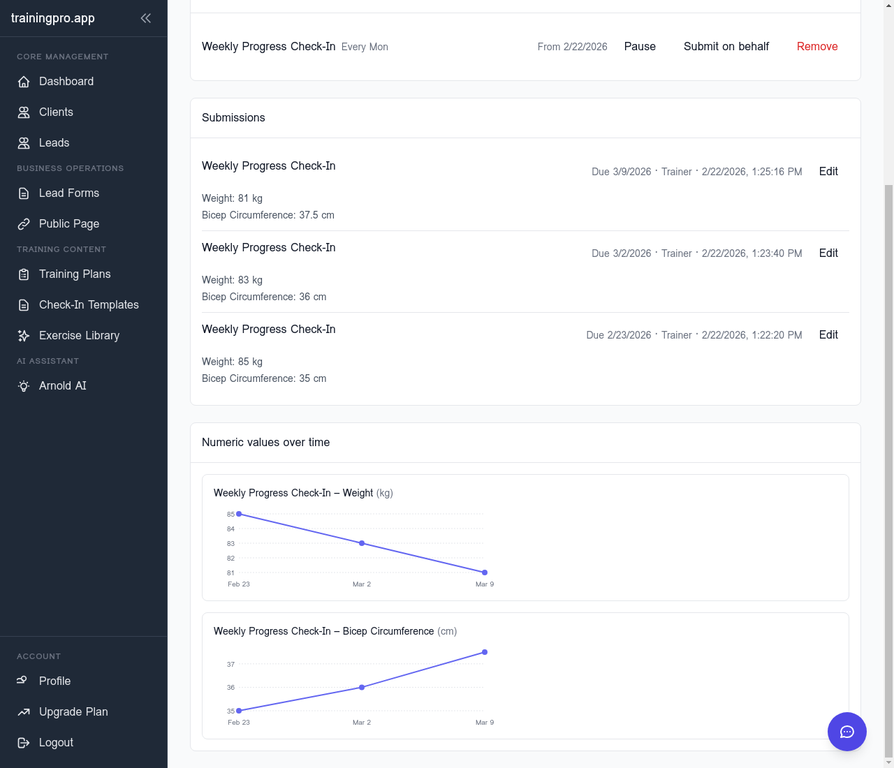
This isn't just data; it's proof. It's the undeniable evidence that your coaching is working, presented in a professional, easy-to-understand format.
Stop Drowning in Data, Start Using It
Your time is too valuable to spend wrestling with spreadsheets or trying to make a generic system fit your unique coaching style. Custom Check-Ins give you the power to collect the right data, at the right time, and use it to deliver better results.
Ready to build a data-driven coaching business?
Ready to Transform Your Fitness Business?
Join thousands of trainers using TrainingPro to automate admin, grow their client base, and focus on what they love—coaching.
Start your 14-day free trial • Cancel anytime


