
How to build an exercise library for fitness success
If you’ve ever spent 20 minutes hunting for the right squat variation before a client session, you already know the problem. Trainers who rely on scattered notes, random YouTube bookmarks, and memory-based programming waste time they can’t afford to lose. A well-built exercise library changes that completely. It gives you a single, searchable source of truth for every exercise you program, so you can build better workouts faster and customize them for any client. Established databases like ExerciseDB contain over 11,000 exercises to jumpstart your collection. This guide walks you through exactly how to build yours.
Key Takeaways
Define your goals and requirements
Once you see why a dedicated exercise library matters, the next step is defining your own goals before building. Without clarity here, you’ll end up with a bloated, disorganized collection that’s harder to use than your old notes.
Start by asking: who are your clients? A trainer working with general population adults needs a different library than one specializing in athletes or post-rehab clients. Your library should reflect your niche, not every exercise that exists.
Next, list the core features your library needs to support:
- Search and filter by muscle group, equipment, or difficulty
- Custom coaching cues for your preferred teaching style
- Video or GIF support for visual instruction
- Tag system for client level, goal, or movement pattern
- Program integration so exercises link directly to client plans
Aligning your library with evidence-based methodologies like FITT-VP (Frequency, Intensity, Time, Type, Volume, Progression) ensures your programming meets professional standards. This matters especially if you hold ACSM, NASM, or NSCA credentials.
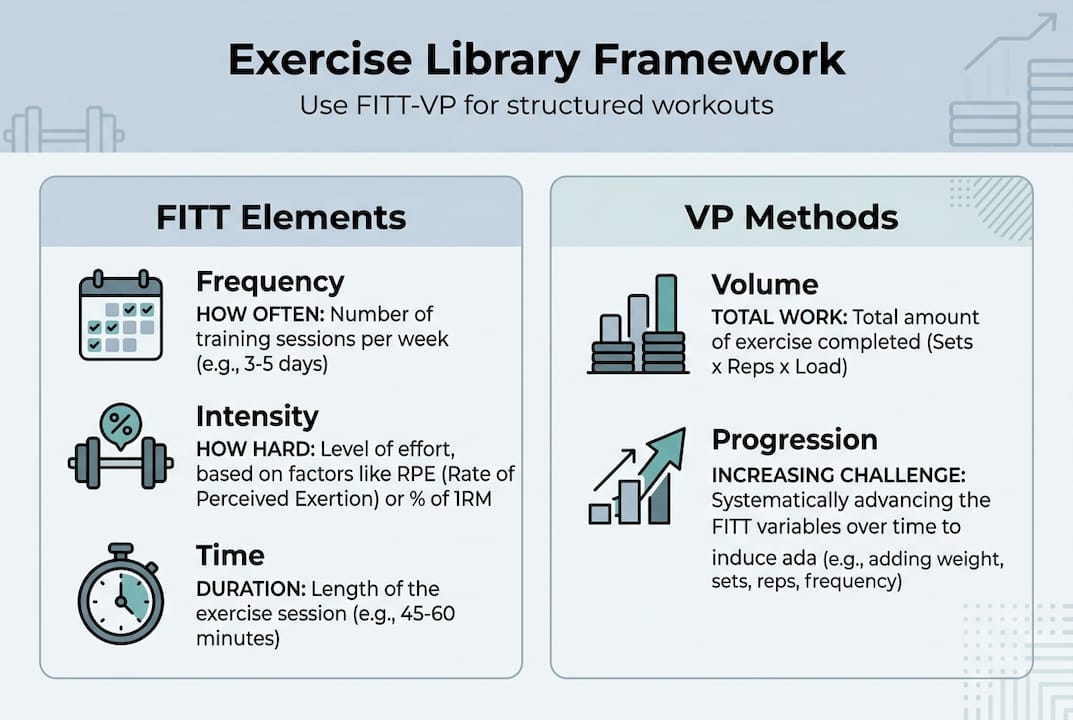
Finally, plan for growth. Decide how often you’ll review entries, who can suggest new exercises, and how client feedback will shape updates. Check out exercise library ideas to spark your thinking before you start building.
Pro Tip
Keep your initial scope tight. A focused library of 150 to 200 well-documented exercises beats a messy collection of 1,000 half-finished entries every time.
Gather reliable sources and templates
With your requirements in hand, you’re ready to curate and format your source material. The goal here is quality over quantity, and starting from trusted sources saves you hours of fact-checking.
Two databases stand out for trainers building from scratch. ExRx.net covers 2,100+ exercises with detailed mechanics and muscle diagrams. ExerciseDB goes further with 11,000+ entries, including videos and GIFs. Both are solid starting points, but always cross-reference technique details with ACSM/NASM/NSCA resources before adding an exercise to your library.
Here’s a comparison of the two main public databases:
Every entry in your library should follow a consistent template. Here’s what each record needs:
- Exercise name (primary and any common alternatives)
- Step-by-step instructions (clear, numbered mechanics)
- Coaching cues (your personal teaching language)
- Primary and secondary muscles targeted
- Equipment required
- Video or GIF link
- Modification notes (easier or harder options)
Learn more about using exercise library tools to see how this template works inside a real platform. For video demos and muscle targeting, a visual guide can help you set the right standard from day one.
Pro Tip
Copy the template into a spreadsheet or your platform of choice and fill it out for 10 exercises before scaling. This reveals gaps in your structure early.
Document exercises: details and safety essentials
After gathering your exercise choices, it’s time to ensure each one is recorded with maximum clarity and safety. Vague instructions are a liability, not just an inconvenience.
Here’s the numbered process for documenting each exercise entry:
- Write the name and any common alternate names clients might search.
- List step-by-step mechanics in plain language, not textbook jargon.
- Add coaching cues that reflect how you actually teach the movement.
- Attach a video or GIF showing correct form from the most useful angle.
- Identify primary muscles and note secondary muscles involved.
- Specify equipment needed, including any substitutes.
- Include safety notes for common errors, contraindications, or injury risks.
Visual content matters more than most trainers realize. Step-by-step mechanics and video demos reduce miscommunication between you and your clients, especially for remote or hybrid coaching. When a client can watch a GIF loop of the correct movement, form errors drop significantly.
Safety callout
Poor technique documentation increases injury risk. If your instructions are vague, clients fill in the gaps themselves, and that’s where injuries happen. Every entry should be clear enough for a new client to follow without asking a single question.
Technique is critical for program safety, and your library is the place to enforce your standards consistently. Use AI for exercise documentation to speed up the writing process without sacrificing accuracy. You can also browse exercise demos for formatting inspiration.
Organize, tag, and program for real-world use
Once each exercise is detailed, the real power comes from making your library easy to navigate and program with. A well-tagged library cuts your program-building time in half.
ACSM and NSCA texts recommend organizing exercises by muscle group, movement type, equipment, or client suitability. Use all four as tag categories, not just one.
Here’s an example of how tagging works in practice:
Set up your folders or filters using these categories:
- By muscle group: Chest, back, legs, shoulders, core, arms
- By client level: Beginner, intermediate, advanced
- By equipment: Bodyweight, dumbbells, barbells, cables, machines
- By goal: Strength, hypertrophy, endurance, mobility, rehab
Pro Tip
Create a separate tag or folder for special populations, such as seniors, prenatal clients, or post-surgical cases. This makes it fast to pull appropriate exercises without filtering through your entire library.
For real-world programming examples and program customization tips, see how other trainers structure their libraries for diverse client rosters.
Expand with progressions, variations, and updates
With your base library working, ongoing expansion and smart adaptations keep it client-focused and results-driven. A static library gets stale fast.
Here’s how to build progressions and regressions into your system:
- Identify the base movement (e.g., standard push-up).
- Add one regression for beginners or clients with limitations (e.g., incline push-up or wall push-up).
- Add one or two progressions for advanced clients (e.g., archer push-up or weighted push-up).
- Link all variations within the same entry or tag them as a family.
- Note contraindications for each variation, especially for injury adaptations.
For example, a squat entry for a senior client might include a chair-assisted squat as the regression, a standard goblet squat as the base, and a Bulgarian split squat as the progression. This gives you three ready-to-use options without rebuilding from scratch.
Keep your library current with a simple update routine:
- Monthly: Review client feedback and flag exercises that need clearer cues.
- Quarterly: Add new variations based on programming trends or client requests.
- Annually: Audit the full library against updated ACSM guidelines and remove outdated entries.
Consistent use and gradual optimization drive the greatest gains in library value, not a perfect launch. Start simple, use it daily, and let real client data guide your updates. See how to handle adapting for injuries and track fitness progress to keep your library aligned with client outcomes.
Boost your training business with smart exercise libraries
Building a great exercise library is only half the equation. The other half is having the right platform to manage, deliver, and scale it without burning hours on admin.
TrainingPro gives fitness professionals a purpose-built environment to organize their exercise library, attach video demos, apply tags, and connect exercises directly to client programs. Arnold AI, TrainingPro’s built-in AI assistant, helps you build tailored programs faster by pulling from your library based on client goals, injuries, and training history. You can explore the AI workout builder to see how it works in practice, or download the AI Workout Guide for a deeper look at AI-powered programming. TrainingPro saves trainers over 10 hours weekly, so you spend more time coaching and less time searching.
Frequently asked questions
ExRx.net and ExerciseDB provide thousands of exercises with step-by-step guides and videos, making them the strongest starting points for any trainer building a library from scratch.
Schedule monthly and quarterly reviews to add new variations and incorporate client feedback. Consistent library updates improve both the value and effectiveness of your programming over time.
Add regressions and alternative variations for different abilities, guided by ACSM or NSCA standards. Tag these clearly so you can pull them up instantly during program design.
Absolutely. Videos and GIFs improve instruction clarity and reduce form errors, which is especially important for remote clients who don’t have you in the room to correct them.
Yes. Starting with a focused, well-documented set of exercises and expanding based on real client data is far more effective than trying to build everything at once. Gradual optimization consistently outperforms a rushed, bloated launch.
Ready to Transform Your Fitness Business?
Join thousands of trainers using TrainingPro to automate admin, grow their client base, and focus on what they love—coaching.
Start your 14-day free trial • Cancel anytime


